
Friday afternoon, 4.23 pm. The client writes that she’s had a look at the staging environment. Great work, everything’s brilliant — just a few minor issues. She’ll send a screenshot tomorrow.
On Monday morning, you open an email with three PowerPoint slides attached. On slide two, circled in red with Paint: “The button at the bottom right looks a bit odd.” Which button? Which device? Which state of the page? Unclear.
You write back. She replies on Wednesday.
Anyone who works in an agency knows this moment. And anyone who knows it knows: the real problem isn’t the feedback. It’s the process leading up to it.
[.no-toc]The real problem is handover[.no-toc]
The classic feedback cycle looks like this: client gives feedback → agency interprets it → agency translates it into tasks → developer works through them → next round. Each of these handovers takes time. And each one leaves room for interpretation.
What falls by the wayside isn’t quality — it’s speed.
The client waits. The agency coordinates. In the end, hours appear on the invoice for which the client feels they’ve seen no output. Not because nothing happened — but because most of it was invisible organisational work.
That is precisely the real problem. And that is exactly where the sitebrunch integration in awork comes in.
Feedback directly on the website — just like in Figma, only live
[.toc-name]Feedback directly on the website[.toc-name]
sitebrunch is a tool from Hamburg that enables agencies to leave feedback exactly where it arises: on the actual website, directly on the element in question.
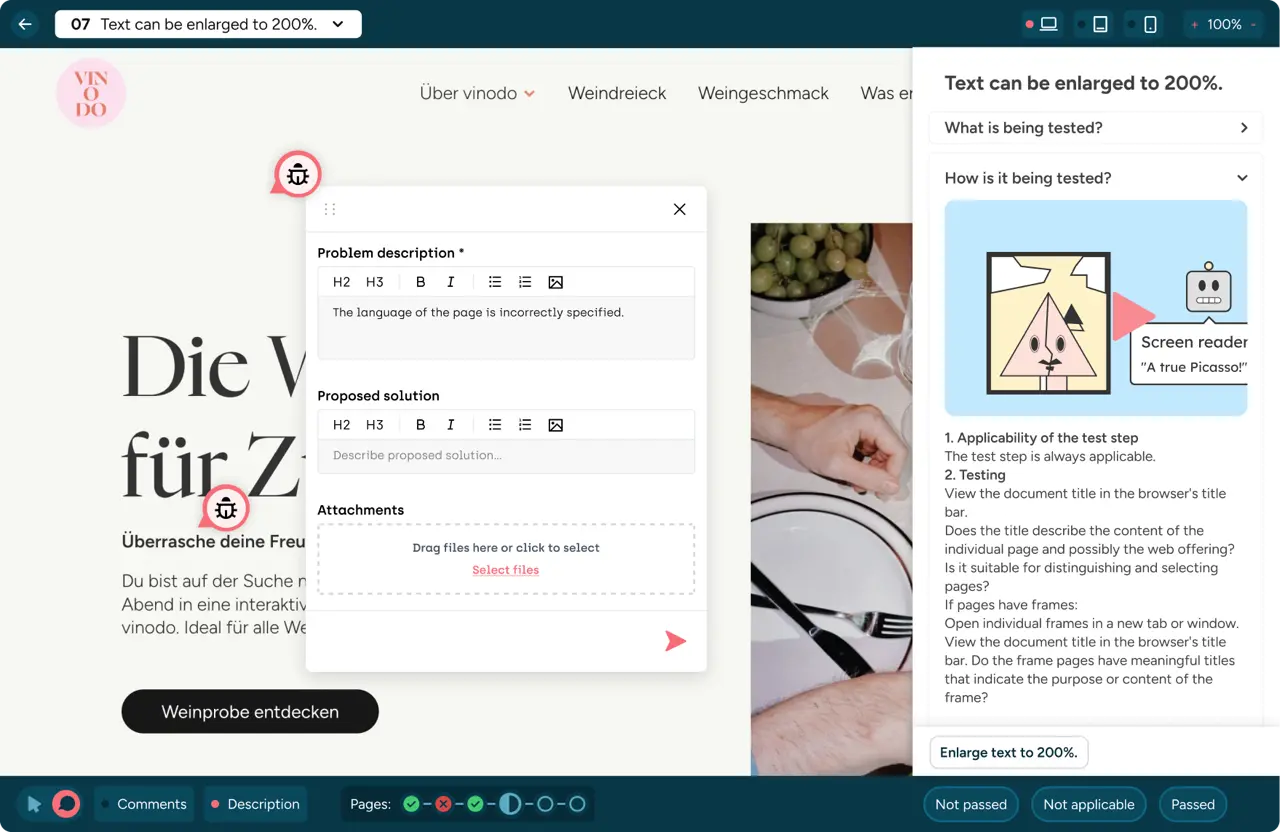
Using a browser extension, the client simply clicks on an area, writes their comment — and sitebrunch automatically attaches a screenshot of the current page state. No extra login. No need to access a third-party system. No need for an explanatory phone call beforehand.
The customer sees their website. They click. They write. Done.
It feels just like commenting in Figma or Miro — only it doesn’t happen in a mock-up, but on the live website or staging environment.
From comment to task — no intermediate steps
[.toc-name]From comment to task[.toc-name]
With the sitebrunch integration for awork, this comment automatically becomes a task in a predefined awork project. No redirection. No copy-paste. No “I’ll have a look at this and get back to you.”
The comment is the task.
Whether it’s a bug, a WCAG issue, a text request or a design adjustment — it lands directly where the team is working. With a screenshot, with context, with the exact element on the page. Clear, traceable, actionable.
Benefits for day-to-day agency life
The difference isn’t just one less step in the process. It changes the way collaboration feels — for both sides.
For the agency team:
- No more lengthy email threads that need to be sorted through
- No need to translate vague feedback into specific tasks
- Tasks are created where the work happens — directly in awork
- The review phase requires significantly less coordination effort
For the client:
- Giving feedback is as simple as adding a comment to a document
- No training on new tools required
- Your own website is the basis for the work — nothing is closer to the end result
- The feeling: my feedback is taken on board straight away, not lost somewhere
That last feeling is almost the most important. Because clients who see their comments being implemented quickly and smoothly build trust. They don’t follow up. They don’t send follow-up emails. And they come back.
A real selling point for the next round of pitches
Agencies that establish this workflow can promise their clients something that wins them over in pitches: a collaboration that feels like real work — not project management overhead.
Clients are happy to pay for results. They’re less keen to pay for coordination.
Agencies that take this seriously and respond with the right setup will stand out. Not through price, but through the experience. And through efficiency that the client actually feels.
[.b-important-block]Less PM work = more billable time[.b-important-block]
[$tag]💡[$tag]
The workflow in practice
A concrete example: The client is looking at the staging environment of the new website.
Step 1: They open the browser extension and click directly on the part of the page that catches their eye — for example, an incorrectly placed line break on mobile.
Step 2: They leave a comment. sitebrunch automatically saves a screenshot of the current state alongside it.
Step 3: The comment appears as a task in awork — in the correct project, with all the information the team needs to implement it.
Step 4: The team works through the task. Next round.
No phone calls. No emails. No “can you show me exactly what you mean again?”
---
Bonus: When the coding assistant takes over straight away
For teams who want to go one step further: sitebrunch is currently testing an MCP server that forwards comments directly to AI coding assistants such as Claude Code or OpenAI Codex. Because the feedback was left on the page with element-level precision, the assistant knows not only *what* needs to be adjusted — but also *where* in the code. The fix can be triggered automatically before a developer has even opened the task. Anyone who wants to try this out can sign up for the beta directly with sitebrunch.
FAQs
What is sitebrunch and how is it used in agencies?
sitebrunch is a visual website feedback tool for web agencies that enables clients to leave feedback directly on the live website or staging environment — without needing to log in or learn how to use a new system. Agencies use sitebrunch to automate the traditional feedback process: instead of collecting feedback via email or screenshots, the client clicks on the relevant element of the website and leaves a comment.
sitebrunch automatically converts this comment into a task in awork, without any manual intermediate steps.
The tool is aimed at agencies that want to shorten recurring feedback loops in web projects and reduce the coordination effort between the client and the development team.
Does the client need to learn a new tool?
After registering with sitebrunch, clients simply need to install a browser extension — no further training, no login and no access to internal agency systems is required. Once installed, the client works directly on their own website, which they are already familiar with from their day-to-day project work.
The feedback experience is deliberately designed to resemble commenting in Figma or Google Docs: click, type, done. For the client, this means no need to switch tools and no additional learning curve — which significantly increases acceptance in practice and reduces the need for explanation on the agency’s part.
What exactly is added as a task in awork?
The customer’s comment, an automatically generated screenshot of the current page view, and the exact location on the page where the comment was left. This means the team receives not just the text, but the full context they need to carry out the task.
How does customer feedback work on staging websites?
Customer feedback directly on the staging website is made possible by sitebrunch: the customer opens the staging URL in their browser and activates the sitebrunch browser extension — no login required, and no access to internal systems. They then click on any element on the page, such as a button, a text field or an image, and leave a comment there.
sitebrunch automatically captures a screenshot of the current page state, the exact URL and the relevant HTML element. This comment is immediately transferred as a task to the linked awork project — including all the contextual information the team needs to implement the change. Neither an email nor a separate ticket is required. The process works on both live websites and password-protected staging environments, including Basic Authentication areas.
Can the agency specify which awork project the tasks are assigned to?
Yes. The assignment to a specific awork project is set once in the settings. After that, everything runs automatically.
Is this only worthwhile for large projects?
No. Especially for smaller projects, where every round of coordination makes a noticeable difference, the workflow makes a big difference. Less back-and-forth means faster implementation — regardless of the project size.
How much does it all cost?
The awork integration and MCP server handling are already included in the sitebrunch free plan. So: Nothing.