Project management tool on one side. Quotes, invoices, controlling on the other. Doing both well at the same time is difficult, and all all-in-one solutions fail at exactly that.
In this article, we show how awork and OS/ work together as a best-of-breed combination: from the first quote to the finished invoice, without the stress of switching tools.
Here's what to expect:
- Why all-in-one is a compromise for agencies
- What the workflow looks like in practice
- What awork and OS/ each handle and how the integration works
The All-in-One trap: Well intentioned, poorly executed
[.toc-name]All-in-One trap[.toc-name]
Many agencies have tried it: one tool for everything. Log in, done. No interfaces, no data chaos.
The problem: if you want to map everything at once, you can never go really deep anywhere. An electrician doesn't fix roof problems – a generic all-in-one tool won't do justice to either the creative team or the controlling department.
In agencies, there are two fundamentally different needs:
- Creatives and project managers want to know what needs doing, who's doing it, and by when. They want to manage tasks, not track euros.
- Accounting and management want quotes, invoices, margins, and forecasts. They need numbers, not Kanban boards.
Trying to satisfy both with a single tool almost always means neither group is truly happy. That's why awork deliberately relies on best-of-breed: the specialised project management tool combined with specialised agency software – in this case OS/.
Shared workflow: 3 phases, 2 tools
[.toc-name]Shared worfklow[.toc-name]
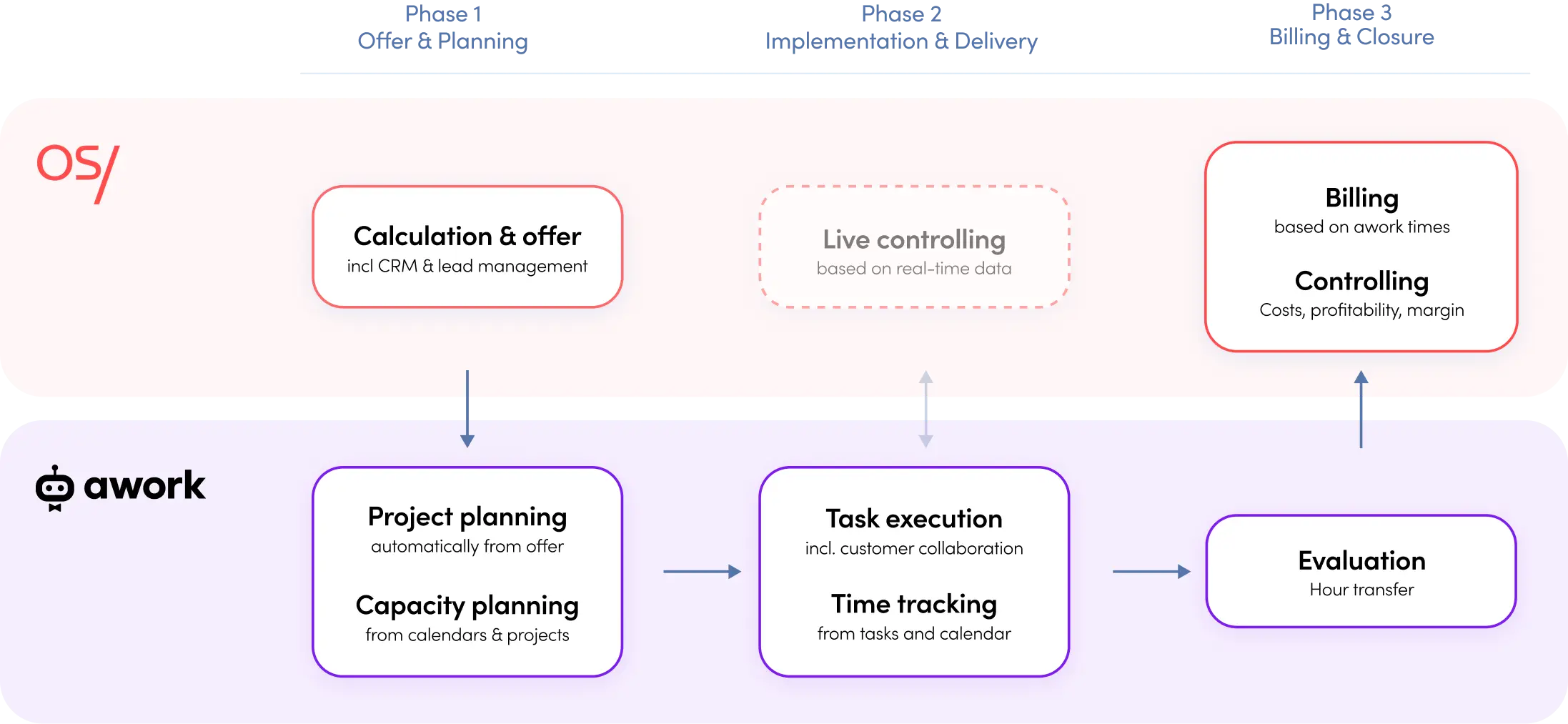
The core of the awork–OS/ integration is simple: both tools do what they do best and feed the other with exactly the information it needs, synchronised in real time.
Phase 1: Quote and Planning (OS/)
Everything begins in OS/. This is where the project budget is calculated, which simultaneously serves as the quote to the client. Teams define services, planned hours, and costs – always with both sides in view: the sale price and the actual employee costs.
OS/ doesn't calculate with a flat internal hourly rate, but with the actual labour costs of employees plus an overhead surcharge – this makes the calculation significantly more precise.
Once the budget has been set up, the integration kicks in: the project appears automatically and in real time in awork. Euro line items become concrete tasks with planned values. Teams can get started on the work immediately.
Phase 2: Execution and Time Tracking (awork)
In phase two, everything stays in awork. Teams plan capacities, distribute tasks, and track time – directly where they're already working. No context switching, no double entry.
What awork offers here:
- Capacity planning: Who still has free capacity? Which team can take on the project? The Planner displays workload graphically and in real numbers.
- Flexible project views: Task list, Kanban board, or Gantt timeline – depending on the team's way of working.
- Simple time tracking: Via stopwatch directly on the task, manually, or with calendar integration.
- awork Connect: External parties (e.g. clients or freelancers) can be invited into the project free of charge. No more e-mail ping-pong.
All tracked times are fed back to OS/ in real time. Controlling in real time, not just after the project is complete.
Phase 3: Invoicing and Controlling (OS/)
Data is transferred continuously in real time and made available for controlling. Here, project managers and accounting can see hours worked versus hours planned, actual labour costs versus the calculation, and the project margin in real time.
Invoicing is flexible: time & material, project price quote, or retainer. Partial invoices, third-party costs such as travel or freelancer services – everything can be billed in granular detail. The finished invoice is issued in ZUGFeRD format and automatically transferred to DATEV.
awork is built for agencies
There are more than 350 project management tools on the market. All of them can handle projects and tasks in some way. awork is developed for agencies – and that is the difference.
Agencies don't lose profitability through poor work, but through a lack of visibility: into capacities, time, and the actual status of projects. awork delivers all planning-relevant information in one place – so teams spend less time clarifying things in meetings and more time actually delivering.
- Team planning that reflects agency reality.
Spontaneous client requests, parallel projects, bottlenecks caused by holidays or illness – static boards always show only a snapshot. The awork Planner shows workload in real time: who still has capacity? What skills does the team bring? Can we meet the deadline? Bottlenecks and idle time are visible before they become a problem. Tasks can be entered directly into individual calendars so that planning and day-to-day business don't drift apart.
- Time tracking that actually gets used.
Nobody enjoys tracking time – which is why awork keeps the effort as low as possible. Teams can track via stopwatch directly on the task, enter times manually via the daily or weekly view, or link their calendar and convert appointments into time entries with a single click. The result: more complete data, less after-the-fact entry, and a time tracking rate that actually shows up in controlling.
- Project management that adapts to the team.
Whether a classic task list, Kanban board, or Gantt timeline – awork offers the view that suits the project. Tasks can be given dependencies, assigned to individuals, and prioritised. Those working in an agile way can structure backlogs and sprints. Rough plans can be translated directly into concrete tasks – without the detour of additional tools.
- External collaboration without licence costs.
With awork Connect, clients, freelancers, or external partners can be invited directly into the project – free of charge, without their own licence. This keeps feedback and coordination where the work happens, and replaces e-mail chains with structured collaboration within the project.
- Time reporting at every level.
Not only project-by-project, but also across clients or teams, awork enables individual time reports. Teams can see where hours are going – and whether planning aligns with reality. This is the data foundation on which OS/ builds for invoicing and controlling.
[.b-button-primary]Try awork for free[.b-button-primary]
What OS/ contributes to the agency process
[.toc-name]OS/ for agencies[.toc-name]
OS/ handles everything related to agency finances – from the first calculation to the finished invoice.
- Calculation and budgeting:
Drag-and-drop from past projects, optional line items, flat-rate or package quotes. The creative concept from last year's autumn campaign as the basis for the winter campaign? One click.
- Service burndown and project controlling:
OS/ shows how quickly employee hours are being burned on a project – and whether particularly expensive staff are working on it. Anyone who looks at these figures early can course-correct before margin is lost.
- Forecast like a P&L:
The OS/ forecast is structured along the lines of a management accounts report – total revenue, external costs, gross profit, operating result. Not weeks after the monthly close, but on an ongoing basis.
- OS/ AI:
Directly within the software, teams can ask via prompt: "How can I make three per cent more margin with my best client?" OS/ AI identifies patterns, names the levers, and delivers concrete recommendations for action. The AI is hosted in Germany at Amazon Web Services in Frankfurt – fully GDPR-compliant.
When the combination of awork and OS/ makes sense
[.toc-name]Combine both tools[.toc-name]
Best-of-breed means: each tool does what it does best. The awork–OS/ integration delivers the most value when creative work and financial management are clearly separated yet need to be based on the same data.
This is typically the case when teams think separately in terms of operational work and finance controlling, when many projects run in parallel, when real-time controlling is needed rather than monthly reports, or when a clean DATEV connection and e-invoicing are required.
Watch the whole webinar showing the agency workflow with awork and OS/
Frequently Asked Questions
[.toc-name]FAQs[.toc-name]
How does the day-to-day collaboration between awork and OS/ work?
Projects and budgets are created in OS/ and transferred directly to awork via the integration – including tasks, planned values, and end dates. Teams work in awork, track their time there, and everything flows back automatically into OS/. This way, project management and controlling always share the same data.
Can agile projects also be mapped with both tools?
Yes. awork supports agile working – with backlogs, sprints, or flexible task packages. Regardless of how granularly tasks are structured in awork, times flow correctly back to the budget line items in OS/.
What does the integration between awork and OS/ cost?
The integration is included in the standard pricing of both tools – no additional costs apply.
How does invoicing work at the end of a project?
Based on the times tracked in awork, invoicing can be done directly in OS/ – by time & material, on the basis of the project budget, or as a retainer. Third-party costs such as travel or freelancer invoices can be added separately. The finished invoice is sent automatically to DATEV.
[.no-toc]Conclusion: Specialisation beats compromise[.no-toc]
All-in-one sounds appealing. In practice, it usually means: a little bit of everything, nothing done really well.
awork and OS/ take a different approach: each tool going deep in its own area, connected by a real-time integration that doesn't interrupt the workflow. Creatives and project managers stay in awork. Finance and management have everything in OS/. Both sides get exactly the data they need – without detours.
If you'd like to see this for yourselves: book a demo and test the workflow with your team.
[.b-button-primary]awork and OS/ integration[.b-button-primary]