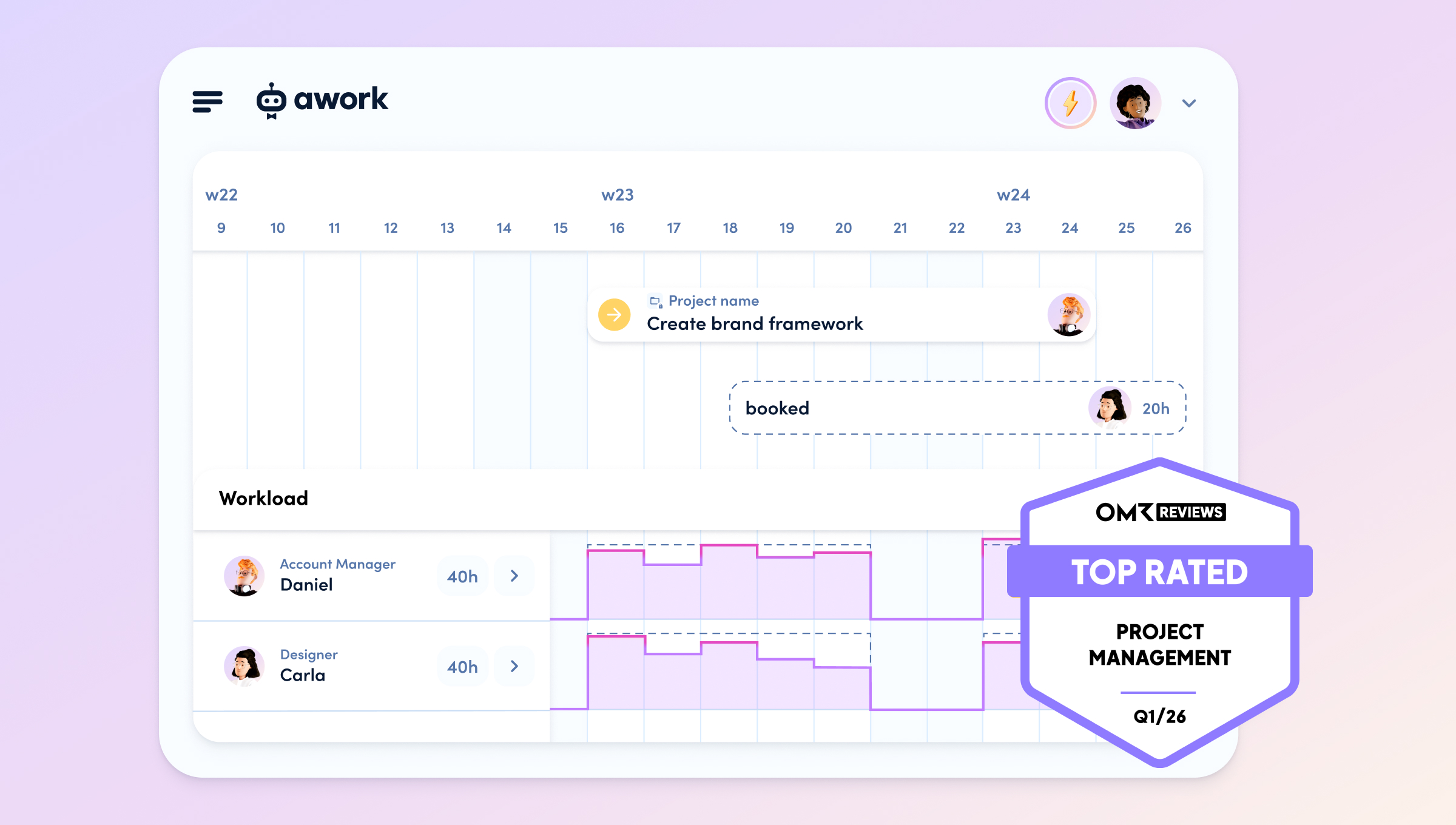
Agencies thrive on billable project work. This means: time must be tracked, budgets must be maintained, and utilization must be actively managed – it's not just about organizing tasks.
The right project management software becomes the central control center for agency profitability. 🚀
In this article, we compare seven PM tools from an agency perspective and show which ones natively connect time, budget, and utilization and which require custom fields and manual configuration
[.no-toc]Which project management software fits which agency?[.no-toc]
For agencies, the combination of project management, team planning, time recording and external collaboration is essential to manage projects clearly and economically.
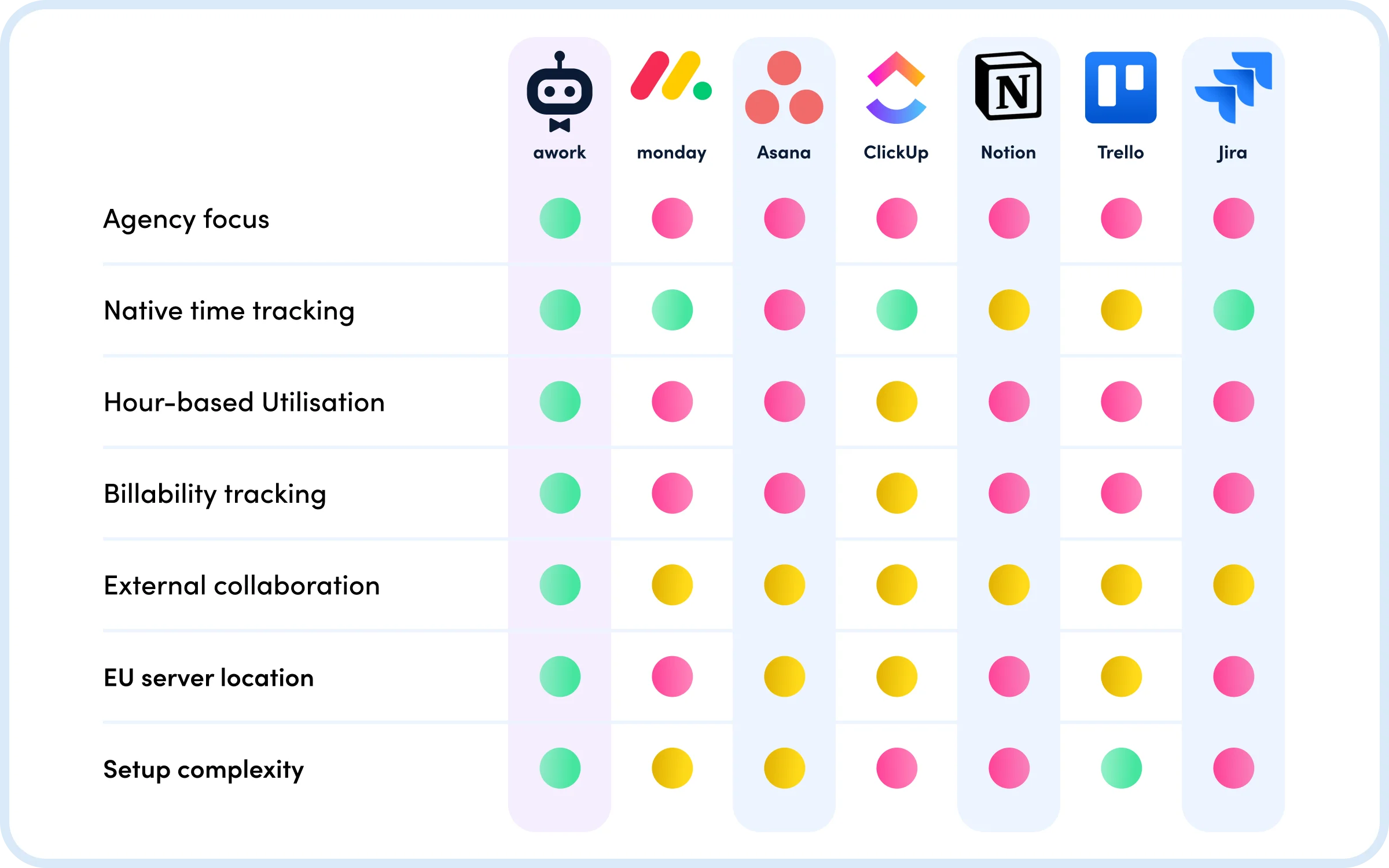
Of the seven compared project management software solutions, only awork was specifically developed for agencies.
While monday.com, Asana, ClickUp, Notion, Trello, and Jira are generic project management software that either offer no native agency functions or require extensive configuration, awork delivers the core agency logic (Time → Budget → Utilization → Profitability) natively integrated.
Other tools require external time tracking tools (Asana), manual custom field configuration for budgets and billability (monday.com, ClickUp), or are primarily designed for other target groups (Jira for IT teams, Notion for documentation, Trello for simple Kanban organization).
For agencies that need to economically manage billable project work, awork is the only project management software in this comparison that offers all core functions without setup, external tools, or Enterprise surcharge for EU hosting.
[.b-button-primary] Curious? Try awork for free! [.b-button-primary]
What does project management software for agencies need?
[.toc-name]Requirements for agencies[.toc-name]
Agencies aren't generic teams. Their business model is different: time = money. Projects need to be delivered not just on time, but profitably. Teams shouldn't be over- or under-utilised. Clients and freelancers work directly inside the projects.
Project management software for agencies has to make billable project work commercially manageable. Six criteria are decisive:
- Time tracking should be natively integrated, not a bolted-on add-on.
- Project and time budgets must be calculated automatically and visible in real time.
- Capacity planning should be hours-based on real availability, not task-based.
- Billability tracking must automatically distinguish between billable and internal time.
- External collaboration with freelancers, clients and partner agencies must scale.
- EU hosting should be available for sensitive client data.
What the key terms mean
- Hours-based capacity planning plans utilisation based on real availability in hours – including working hours, holidays, calendar appointments and time already tracked.
- Task-based capacity planning only counts assigned tasks and doesn't reflect actual availability.
- Billability tracking is the automatic distinction between billable and internal time. It shows what share of the hours worked can be charged to clients.
- Native integration means a function is built into the tool and works without an add-on, custom fields or formulas.
7 Project management tools compared
Evaluation criteria and methodology
All seven tools are rated against the same six criteria: project management, time tracking, capacity planning, billability tracking, external collaboration, and data protection and servers. Each criterion gets a traffic-light rating:
- 🟢 Natively integrated – works out of the box and is designed for agency workflows.
- 🟡 Limited – available, but only with configuration, extensions, extra cost or no agency logic.
- 🔴 Not available – the function is missing or unusable for billable agency work.

1. awork: project management software built for agencies
Headquarters: Hamburg, Germany | Cost: from €5/month | Target audience: Agencies
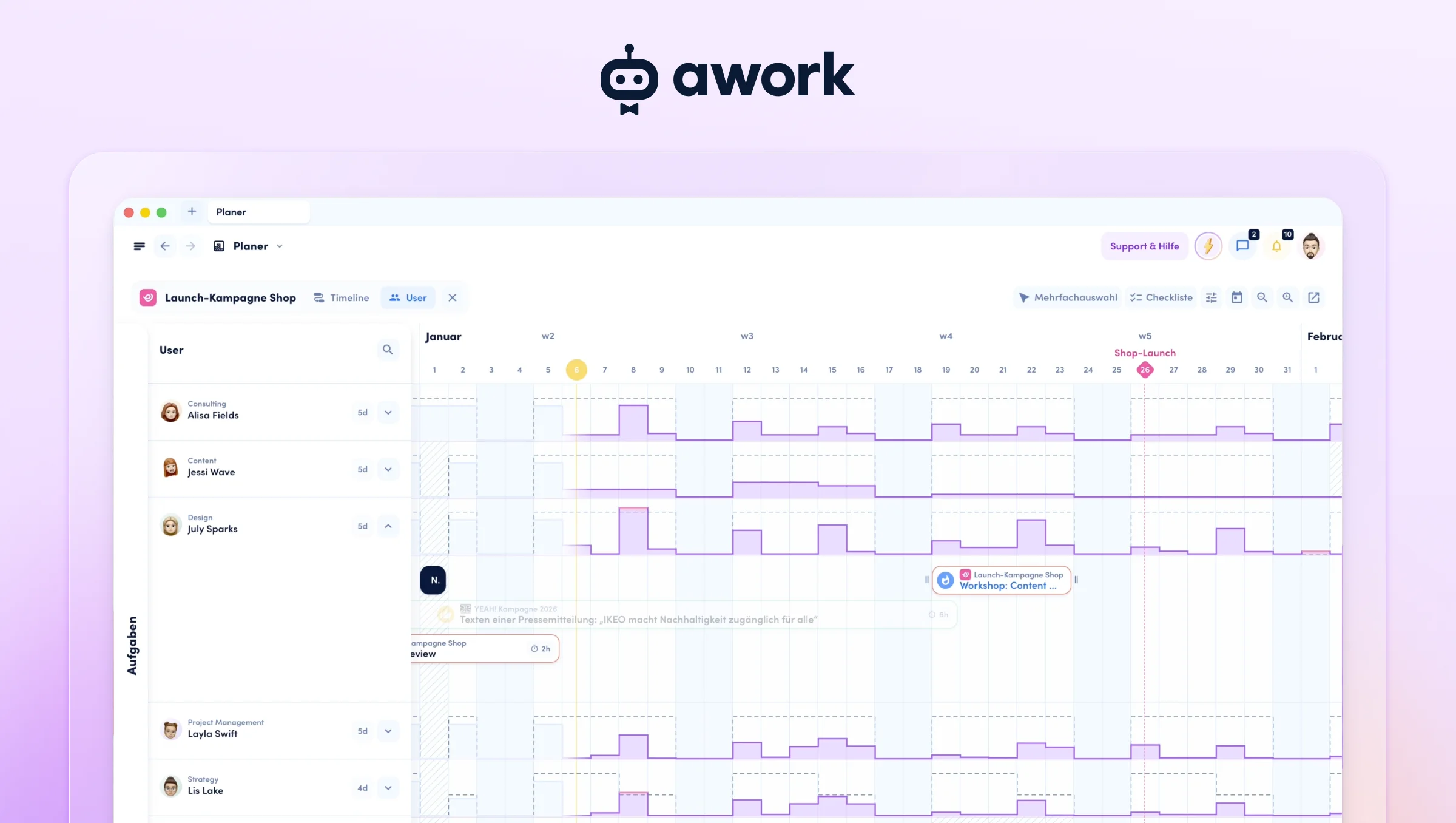
awork is a project management platform that is built specifically for agency workflows.
🟢 Project Management
awork offers project planning with tasks, subtasks, dependencies and checklists that can be displayed in list, Kanban, or timeline views. Multi-project planning is supported by smart filters and a configurable dashboard. Especially important for agencies: project and time budgets are natively integrated and show consumption in real-time.
🟢 Time Tracking
Time tracking is natively integrated in awork and offers multiple tracking methods like timer, drag & drop, calendar integration, and AI-assisted tracking. Tracked time is automatically linked to budgets, utilization, and billability. For agencies, this means: tracking time is simultaneously managing budget.
🟢 Capacity Planning
Planning of capacities in awork is based on real availability in hours and automatically considers individual working hours, vacations, calendar appointments, and already tracked time. This enables realistic utilization management instead of theoretical task lists.
🟢 Billability Tracking
In awork projects are marked as "billable" or "internal", and all time tracked on them automatically inherits this status. This means: no manual marking of each time entry, automatically transparent billability rate.
🟢 External Collaboration
Via awork Connect projects are shared between separate workspaces, similar to Slack Connect. Each party works in their own workspace without incurring additional costs. This enables scalable collaboration with freelancers and clients.
🟢 Data Protection & Servers
The awork servers are located exclusively in Germany (Frankfurt), the system is GDPR-native and ISO 27001-certified – in all pricing plans.

Summary for agencies:
✅ Optimally suited.
awork was specifically developed as project management software for agencies. All core functions for billable project work (time, budget, utilization, billability) are natively integrated and work from day 1. EU servers are available in all plans, onboarding time is low.
Limitations:
Less universally customizable than generic project management tools, but consistently focused on agency workflows.
[.b-testimonial]When I worked with other project management tools in the past, the biggest fuckups were always that the people who made them had no idea about the agency business. With awork, I notice that it's different. It comes from the agency world.[.b-testimonial]

[.b-button-primary]Generic tool vs. agency specific tool[.b-button-primary]
2. monday.com: flexible project management software
Headquarters: Tel Aviv, Israel | Cost: from $9/month | Target audience: Cross-industry
monday.com Work OS is a customizable project platform that helps teams across all industries manage work processes.

🟢 Project Management
monday.com offers flexible boards with custom columns, various views, and extensive automation options. For agencies, however, this means: there is no pre-built agency logic, requiring intensive configuration to map billable project work.
🟡 Time Tracking
A time tracking column is available and time can be tracked on items. Problematic for agencies, however, is that tracked time is not automatically linked to project budgets. Economic evaluations require custom columns and formulas that must be manually maintained.
🟡 Capacity Planning
The workload view is based on task assignments and manually set workload values. For agencies, this is insufficient because working hours, vacations, and calendar appointments are not natively considered – hour-based planning based on real availability is missing.
🔴 Billability Tracking
There is no native function to distinguish between billable and internal time. For agencies, this means: billability must be manually modeled via custom columns per project or task, which is error-prone and creates continuous maintenance effort.
🟡 External Collaboration
Guest roles are available but may be charged proportionally depending on plan and number. For agencies, this means: guests work in the agency's workspace with reduced rights, which can become expensive with many freelancers or clients.
🟡 Data Protection & Servers
Servers are located in the USA and EU. Critical for agencies is that EU hosting (data residency) is only available in the Enterprise plan – Standard and Pro plans store data worldwide

Summary for agencies:
⚠️ Conditionally suitable.
As generic project management software, monday.com is very flexible, but agencies must build their specific logic via custom columns, formulas, and dashboards themselves.
Limitations:
High setup and maintenance effort, no native budget calculation, no automatic billability, EU hosting only Enterprise. Suitable for agencies with resources for intensive configuration.
[.b-button-primary] Compare monday and awork in detail[.b-button-primary]
3. Asana: project management software with task focus
Headquarters: San Francisco, USA | Cost: from $10.99/month | Target audience: Task management
Asana is a modern project management tool designed to simplify teamwork and coordination.

🟢 Project Management
Asana offers classic features like task lists, boards, Gantt charts, timeline, and calendar. However, limiting for agencies is that the focus is heavily on individual tasks. There is no multi-project overview and no native budgets for economic management.
🔴 Time Tracking
Asana offers no native time tracking. For agencies, this means: external tools like Harvest, Everhour, or Toggl are mandatory, leading to additional costs, interface maintenance, and fragmented data.
🟡 Capacity Planning
The workload view shows task-based utilization. For agencies, this is insufficient because working hours, part-time models, and absences are not natively considered and there is no calendar integration – it remains a theoretical workload overview.
🔴 Billability Tracking
There is no native function for billability. For agencies, this is only mappable via external time tracking tools, meaning additional integration and costs.
🟡 External Collaboration
Guest roles with restricted access to shared projects are available. However, for agencies, true cross-company project collaboration is missing – guests remain visitors in the system without equal participation.
🟡 Data Protection & Servers
Servers are primarily located in the USA. For agencies, EU hosting is only available in the most expensive Enterprise plan.

Summary for agencies:
❌ Not designed for billable project work.
As task and project management software, Asana has no native time tracking and no budget logic. Agencies must integrate external tools.
Limitations:
No native agency functions. The tool is suitable for teams who want to organize tasks, but not for economic project management with billable time.
[.b-testimonial]We switched from Asana to awork. The flexibility of awork, from time tracking to task creation, is what I particularly love about it.[.b-testimonial]

[.b-button-primary] Compare Asana and awork in detail[.b-button-primary]
4. ClickUp: all-in-one project management software
Headquarters: San Diego, USA | Cost: from $0/month | Target audience: Cross-industry
ClickUp is a project management platform designed to reduce inefficiencies.

🟢 Project Management
ClickUp offers a very broad range of functions with many views and extensive customization options. For agencies, however, this means: intensive configuration and longer onboarding are required to use the tool productively.
🟡 Time Tracking
Time tracking is natively available but must be activated separately for each workspace. Problematic for agencies is that tracked time is not automatically linked to budgets and there is no native budget calculation.
🟡 Capacity Planning
The workload view is based on estimates and task assignments. For agencies, this is limited because real availability like working hours and vacations are not fully considered.
🟡 Billability Tracking
A manual "Billable" toggle is required for each time entry. For agencies, this is error-prone because no automatic logic exists at the project level and each individual entry must be manually marked.
🟡 External Collaboration
Guest roles are available, with "View only" guests free and "Permission-controlled" guests paid. For agencies, this means: guests work in their own workspace, not in an equal project environment.
🔴 Data Protection & Servers
The tool is GDPR-compliant, but servers are distributed worldwide. For agencies, there is no dedicated EU hosting.

Summary for agencies:
⚠️ Conditionally suitable.
ClickUp offers many functions as all-in-one project management software, but no integrated agency logic. Time tracking is available but isolated. Billability must be manually maintained.
Limitations:
High complexity, no EU hosting, no automatic budget calculation. The tool is suitable for agencies that accept complexity and want to combine many functions in one tool.
[.b-button-primary] Compare ClickUp and awork in detail[.b-button-primary]
5. Notion: note-taking tool with project management features
Headquarters: San Francisco, USA | Cost: from $8/month | Target audience: Cross-industry
Notion describes itself as an all-in-one workspace for notes, tasks, wikis, and databases.

🟡 Project Management
Notion offers infinitely configurable databases and views that can be designed very flexibly. For agencies, however, this means: project structures must be built manually or via templates, which involves high administrative effort.
🔴 Time Tracking
There is no native time tracking function. For agencies, this is only mappable via user-generated templates, some of which are paid and resemble Excel spreadsheets in their logic.
🔴 Capacity Planning
A native function for capacity planning does not exist. For agencies, this means: there is no way to systematically plan team utilization.
🔴 Billability Tracking
There is no native function to distinguish between billable and internal time. For agencies, billability tracking is not mappable in Notion.
🟡 External Collaboration
Areas can be shared with guests who then receive read or edit rights. For agencies, however, there are limits for free guests that vary depending on workspace plan.
🔴 Data Protection & Servers
Notion is GDPR-compliant, but servers are not located in Germany. For agencies, there is no dedicated EU hosting.

Summary for agencies:
❌ Limited suitability.
Notion is primarily a note-taking and wiki tool, not project management software for agencies. Time tracking, budgets, and capacity planning are completely missing.
Limitations:
Suitable for documentation, not for billable project work. Agencies need additional project management software for operational functions.
6. Trello: simple project management software
Headquarters: New York, USA | Cost: from $5/month | Target audience: Small teams
Trello is a tool primarily for individuals or small teams to organize their projects visually.

🟢 Project Management
Trello focuses on Kanban boards with customizable columns, tags, and deadlines. For agencies, the feature set for complex project management is limited – the tool is more suitable for teams of one to three people.
🟡 Time Tracking
There is no native time tracking function. For agencies, it is available via so-called "Power-Ups" (extensions), which must be set up individually by each user.
🔴 Capacity Planning
There is no native function for capacity planning. For agencies, filtering by users is possible, but there is no systematic overview of availability and utilization.
🔴 Billability Tracking
A native function for billability does not exist. For agencies, the distinction between billable and internal time is not mappable.
🟡 External Collaboration
Guests can be added to individual boards. For agencies, however, this means: external guests also require their own license depending on plan, which can incur costs.
🟡 Data Protection & Servers
Trello is GDPR-compliant, but servers are primarily located in the USA. For agencies, there is no dedicated EU hosting

Summary for agencies:
⚠️ More suitable for small teams.
Trello offers simple Kanban-based project management, but no native functions for time tracking, budgets, or capacity planning.
Limitations:
The tool is suitable for simple project organization in small teams (1-5 people), but less so for professional agency work with billable projects. Not a full-fledged project management software for agencies.
[.b-button-primary] Compare Trello and awork in detail! [.b-button-primary]
7. Jira: project management software for IT teams
Headquarters: Sydney, Australia | Pricing: from €0/month | Target audience: IT & Software Developers
Jira is a project management and tracking tool specifically developed for software development teams.

🟢 Project Management
Jira offers a very comprehensive feature set specifically designed for complex IT projects. For agencies, this means: the depth of functionality is enormous, but requires significantly more onboarding than other tools due to its IT focus.
🟡 Time Tracking
A native time tracking function is available but complex to use. For agencies, there are alternatively paid integrations from the Jira Marketplace that are easier to use.
🟡 Capacity Planning
There is no native function for capacity planning. For agencies, this means: paid extensions from the Marketplace are required to plan team utilization.
🔴 Billability Tracking
A native function to distinguish between billable and internal time does not exist. For agencies, billability tracking is not mappable by default.
🟡 External Collaboration
External user groups with restricted access can be set up. Important for agencies to note: guests are free but count as an assigned license, which can increase costs depending on plan.
🟡 Data Protection & Servers
A GDPR app is available and required to establish compliance. For agencies, this means an additional configuration step.

Summary for agencies:
⚠️ More suitable for IT agencies.
Jira is primarily designed for software development teams and has a strong IT focus. For traditional creative or marketing agencies, the tool is too complex.
Limitations:
Very high complexity, no native agency functions like billability or capacity planning without Marketplace extensions. The tool is suitable for developer teams and IT agencies, not for classic agency project management.
[.b-button-primary] Compare Jira and awork in detail! [.b-button-primary]
[.no-toc]Summary: which project management software fits which agency?[.no-toc]
For agencies that have to steer billable project work profitably, awork is the only software in this comparison that delivers all core functions without setup, external tools or an Enterprise surcharge for EU hosting.
Recommendation by agency situation
- Still working with spreadsheets, calendars and email and need a real system for the first time? awork replaces the whole patchwork while staying lean enough that your team adopts it from day one.
- Already using a generic PM tool (Asana, monday.com, Notion, ClickUp) and hitting its limits? awork replaces the PM tool plus the adjacent time-tracking and capacity spreadsheets.
- You're an IT or dev-leaning agency? Jira can work for development – for commercial project steering, awork fills the operational gap alongside it.
FAQs
Which project management software is best for agencies?
awork is best for agencies because it was built specifically for them. awork integrates projects, team availability, time, budget, capacity and billability in one system. Asana, monday.com, ClickUp, Notion, Jira and Trello are generic tools without native agency logic.
awork vs. Asana for agencies
awork is the best choice for agencies because time tracking, budget control and capacity planning are natively integrated — with Asana, agencies have to add external tools such as Harvest or Everhour to achieve this.
awork vs. monday.com for agencies
Monday.com offers maximum flexibility, but lacks pre-built agency workflows - awork provides the time → budget → capacity → profitability connection from day one, without the need for complex configuration.
awork vs. ClickUp for agencies
ClickUp offers a very broad range of features, which is often too complex for agencies - awork is leaner, built specifically for billable client projects and works without a major setup.
awork vs. Notion for agencies
Notion is a powerful documentation and knowledge tool, but not a project management solution for billable agency work - awork combines projects, time tracking and resource planning in a single system.
awork vs. Trello for agencies
Trello is suitable for simple Kanban organisation in small teams, but offers neither native time tracking nor capacity planning - both are natively integrated into awork.
awork vs. Jira for agencies
Jira is built for software development teams - awork is simpler, specifically designed for client projects, and integrates freelancers and clients without guest user licences.
Why do agencies need specialized project management software?
Agencies work project-based and under economic pressure. Time is directly linked to revenue, budgets must be maintained, and utilization must be optimally managed. Generic tools often require extensive configuration to map these requirements. Specialized software delivers the necessary logic out-of-the-box.
Which European project management software is suitable for agencies?
awork is the leading European solution: a German company with servers located in Germany (Frankfurt), ISO 27001-certified and GDPR-compliant across all plans. Other tools usually only offer EU hosting on their higher-priced Enterprise plan, at an additional cost.
What advantages do project management tools offer for agencies?
They bring order to project management and ensure that all stakeholders are always up to date. With integrated time tracking, agencies have their billable hours precisely in view. Team and resource planning immediately shows who is utilized to what extent, so resources can be optimally distributed. Collaboration with external stakeholders like freelancers or clients is significantly simplified through centralized communication.
How do you switch project management software?
Switching to a new tool doesn't have to be complicated. With awork, for example, you first create your free workspace. Then you use the importer to transfer projects, tasks, comments, and dependencies from tools like Jira, Asana, monday, or Notion – without any technical knowledge required. Within minutes, you can continue working with your real data, without tedious copying or recreating.
Especially convenient: you can also directly invite your team and get started together.
[.b-button-primary]Request tool comparison[.b-button-primary]


.webp)